
An open-source, cross-platform way to manage your Token2 keys: Companion App - Rust edition
17-06-2026
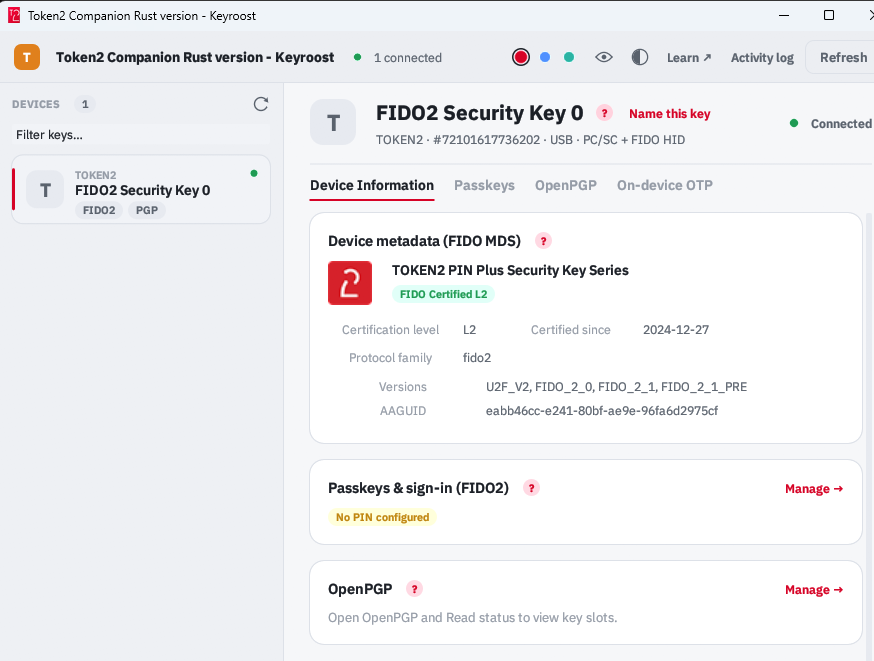 Token2 Companion - Rust edition - an open-source, cross-platform desktop tool for managing Token2 keys, and keys from other vendors too. It runs on Windows, macOS, and Linux, and the whole thing is open source: you can read it, audit it, build it, and extend it.
Why we need it
Our standard Token2 Companion App does the day-to-day work of managing our FIDO2 keys - OTP, FIDO/passkeys, PIV, and OpenPGP. But two things kept coming up from you, our users:
- Linux. A native Linux build of the Companion App has been harder for us to ship than we'd like, and Linux users were left waiting.
- Openness. Plenty of you wanted a key manager you could actually inspect, rather than trust on faith. Rather than start from zero, we built on an engine that already existed and was already good: keyroost, an independent, open-source Rust toolchain for hardware security keys, implemented from public standards with no vendor SDKs. We added support for the Token2 on-device OTP applet and the correct Token2 PIN+ defaults, and we've contributed that work back upstream - so every key manager built on keyroost benefits, not just our edition.
What it does
It manages security keys from any brand over open standards - not just ours. Token2 keys get some extra love (the on-device OTP feature and PIN+ defaults), but a YubiKey or any other FIDO2 key works just fine.
- Device information - serial number, applets present, connection status.
- Device metadata (FIDO MDS) - vendor name and icon, FIDO certification level and date, supported versions, looked up by the key's AAGUID.
- On-device OTP - add, view, and remove TOTP/HOTP credentials directly on the key, with a live countdown for time-based codes and a one-tap Read button for touch-protected entries.
- HID-HOTP - set up the button-press keystroke code, change its typing options, and toggle the keyboard (HID) interface.
- FIDO2 / passkeys - PIN setup, passkey listing and removal, device reset.
- Fingerprint management - enroll, rename, and delete fingerprints on biometric keys.
- PIV - PIN / PUK / management-key operations and certificates, with the correct Token2 PIN+ defaults.
- OpenPGP - on-card signing, encryption, and authentication keys. Keys are managed over USB; NFC management isn't supported yet.
How this relates to the official Token2 Companion App
We want to be straight with you about this, because we think transparency is the whole point of an open tool.
Both editions are published by Token2, and both are here to stay. They overlap heavily - for everyday key management, either one will do the job. The differences are small:
- The Companion App is our own application. It shows a few Token2-specific details such as the firmware version reported by the key, and handles some operations slightly differently - for example, it can set a FIDO2 PIN on Windows without administrator rights (something you can also do through the Windows control panel).
- Companion App - Rust edition is our build of the open-source keyroost engine - the open, cross-platform option, fully auditable and running natively on Linux. So the choice is mostly about what you value. On Windows or macOS, either works. If you're on Linux, or you want open source you can read and build yourself, the Rust edition is for you.
A note on how it's built and supported
keyroost is an independent open-source project - we don't own it and we didn't create it. What we do own is our contributions to it: a large share of the Token2-relevant code was written by us, and we keep it current and test it against real Token2 hardware. So key-specific issues and bug reports are genuinely welcome, and we engage with them on the project.
Two honest caveats that come with open-source software: it's provided without the formal warranty that applies to the Companion App, and releases are managed upstream in the keyroost project rather than by us alone. In practice that means you get a tool built and tested by the people who make the keys - just on open-source terms.
Try it
Downloads (including the Linux AppImage and a one-step Linux setup script) and full documentation are on the project page. We'd love your feedback - and, since it's open source, your contributions.
Token2 Companion - Rust edition is built on the open-source keyroost project. Token2 keys and the Token2 name are trademarks of Token2; other product names belong to their respective owners.
updates tools
Subscribe to our mailing list
Want to keep up-to-date with the latest Token2 news, projects and events? Join our mailing list!